
How to take online bookings on your pest control website
A “request a quote” form is not online booking. Customers who want a technician this week will book with whoever lets them pick a time. Here is what real online booking needs, and how to set it up.
1. Start with service areas
Split the map the way your team works, for example North and South, or by town. Each area lists the technicians who cover it, in priority order, so a new booking goes to the first one who is free.
2. Define what people can book
Give every service a clear title, a price, how long it takes and the travel gap after it. With Ravalak Pest Control Interface Pro you can also add optional extras (a wasp nest, an exterior spray) and products customers can add, such as bait stations.
3. Only show times that are really free
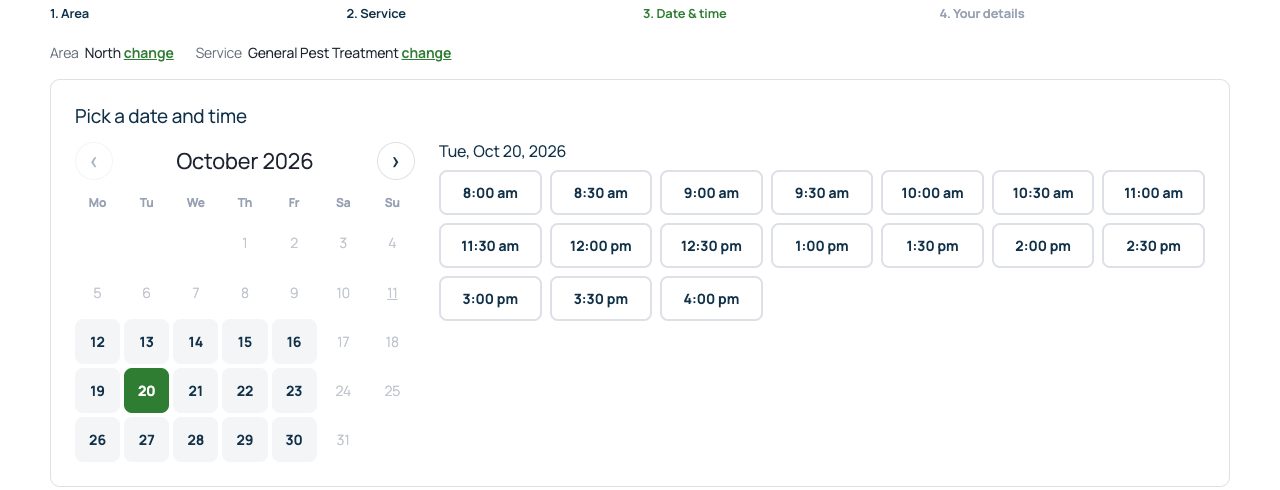
The booking form should check each technician’s working hours, split shifts, time off and existing jobs, and only offer start times that fit. Minimum notice and how far ahead people can book stop last-minute surprises.
4. Take payment, or not
Some customers want to pay by card straight away; others prefer to pay after the visit or by e-transfer. Offer what suits you, and make unpaid bookings easy to spot.
5. Send confirmations and reminders automatically
A confirmation straight away, then reminders a week and a day before, cut no-shows. Each reminder should include a link to move the appointment.
6. Sell plans, not just visits
Quarterly protection plans are where recurring revenue comes from. When a plan is booked, every visit for the agreement should land on the calendar automatically.
Putting it on your own site
Ravalak Pest Control Interface does all of the above inside WordPress, in your branding. See it working on our demo at pcidemo.ravalak.ca, or read more on the pest control software page.